Subscribe:
Showing posts with label Tips. Show all posts

Monday, November 19, 2012

Manage your desktop using Pre-activated Fences 1.01


I have already share details and download links to manage your desktop using fences 1.01 including crack. But today i am going to share another link for fences 1.01. But this software does not need any cracks. It is already cracked.

Download Here

Installation

1. Just install Fences as you install other softwares.
Have Fun, Say Thanks

Wednesday, October 31, 2012

Kaspersky Keys for All Product Version (30/10/2012)

Kaspersky Keys for All Product is a collection of activation keys for products of Kaspersky AntiViruses. At this time the zip package contains the activation keys for Kaspersky Antivirus (KAV) 2012 and 2013, Kaspersky Internet Security (KIS) 2012 and Kaspersky also 2013 Workstation or Server Edition. If you have any of the above products or you can download and protect your computer from any of above product with full features.
 

This Kaspersky Key Pack Contain

1. Kaspersky Anti-Virus (KAV) 2013 and 2012            Activation Key File (139 Key Files)
2. Kaspersky Internet Security (KIS) 2013 and 2012 Activation Key File (33 Key Files)3. Kaspersky Workstation / Server Edition Activation Key File (137 Key Files)4. How To Activate Kaspersky 2013 And Kaspersky 20125. More! Key and Instructions

Link download

    Keys for Kaspersky All version (30/10/2012)

How to use Keys:

Kaspersky 2012  
  1. Download / Install first product kaspersky 2012 version 
  2. Disconnect internet connection
  3. Click "Manage License" and select "Activate the application" 
  4. Enter key: AAAAA-AAAAA-AAAAA-AAAA3 then click Next
  5. In the next tab select "Browse" select the key file> Open
  6. Activation
Kaspersky 2011 
  1. Open Kaspersky 2011 License Manager 
  2. Click the button "Activate the application with a new license" (if you previously had to use another key, just in the clear just yet)
  3. Next select the "Activate commercial version 'and enter the license code: 11111-11111-11111-1111X 
  4. Tuggu activation wizard message -> then click OK
  5. Wait for wrong activation code message appears> then click OK 
  6. On the next tab key find the file you downloaded above> Choose one> Open 
  7. Activation
Kaspersky 2010 
  1. Disconnect internet connection 
  2. Select the trial version and enter Invalid license code:

    
STQRT-2G35E-YQH5G-QUA8H
    
GT5VQ-JX3MF-5SEFR-PX56F
    
5DS6N-FTMZV-HXUDK-H1XAR
    
51MNK-G3KW3-KHCZZ-8CN2M
    
HMSJA-5MX27-FM3VB-3252E
    
BBH1J-BMH1Z-JUWAD-52Y1V
    
H75P6-843Q4-N99RQ-7TRKG
    
K7BXW-1BHGB-AVKHG-F162Q
    
J398A-DR1YN-AG7KC-F2Q5J
    
GT5VQ-JX3MF-5SEFR-PX56F
    
KJEGM-C7274-1G5SN-TSAP3
    
HXGN1-YBCXH-J3KW9-K589V
    
KK9WC-GGMC7-XCYVF-1R8XU
    
H7FUH-KM6TN-S5UTX-93QBS
    
JTCSR-3X2RX-KVRBC-N462M
    
H979W-ANDMZ-N4W1K-Z3RS4
    
7C72Z-GYXM2-G2D95-RY8CV
    
HCW7U-C34VH-ETTWU-YPUGD
    
FNQT5-1YD9E-MJYY8-WXEX8
    
KK98K-HHXWG-C3JG6-6ZZYR
    
HYRPZ-38W2X-MB5DH-KF421
    
J5CPD-63M7R-KBR9E-H6YHB
    
B4862-EGQ3Q-J3GNU-EDECD
    
J5Z1H-NHR8J-9HZFA-DJ5FT
    
3TZV1-Z5F9W-DXBWX-Q1KDA
 
3 . Once the error message appears in the new window looking for the file and    activation key.

Wednesday, October 24, 2012

How to change logon screen in windows 7

Logon Screen Tweaker tool which will help you to customize your Windows 7 logon screen. This is a freeware made by Orbit30 at Win7vista forum.

This is a really simple tool to use, allowing you to change logon screen background, logon sound, user picture, logon buttons, add custom messages etc. This also can remove items from the logon screen such as the Ease of Access button, among others.

This is a portable program so there is no need of any installation. It also contains a built-in Default button, which will revert back all the changes you made to default.

Below are some key features of Windows 7 Logon Screen Tweaker :-

  • Change Logon screen background, Logon sound, Logon buttons, User picture, User name, Logon text branding.
  • Remove Logon text branding, Ease of Access button, Shutdown button.
  • Add custom messages.
  • Built-in Default button, to revert to default.
  • Easy to use.
When you click on the Tools button on the bottom-right side of the program, all the above mentioned features are made available to you.

This tool will only work on Windows 7, both x86 (32-bit) and x64 (64-bit) versions.

Manage your desktop using XUS Desktop 1.8.82 + Serial Key


XUS Desktop 1.8.82 Full Version - is a small software that allows you to tidy up program shortcuts shortcut icon located on your desktop screen so that the desktop will look much neater and more attractive. You can also set the size of the icon, the number of icons, change the user name, and so forth. In addition XUS Desktop 1.8.82 is also very light, so it will not interfere with the performance of our pc.

Screenshot


Features

  • Easy to organize your windows desktop icons
  • Fast & swift way to launch the program
  • Make you windows desktop clear and beautiful
  • Offers a different & wonderful feel to use your computer
  • More useful and helpful functions
  • Offers a perfect solution to handle too much desktop icon's problem
Download Link
         Download  XUS Desktop 1.8.82 + Serial Key
         password :: croosetech

Installation 
    1. Extract or Unrar using Winrar or any compressed file extracter
    2. Install XUS Desktop 1.8.82
    3. Run program
    4. Give any of the serial in serial.txt file
    5. Enjoy !!!

Tuesday, October 23, 2012

How to get Windows 8 Transformation for your Windows XP/VISTA/7

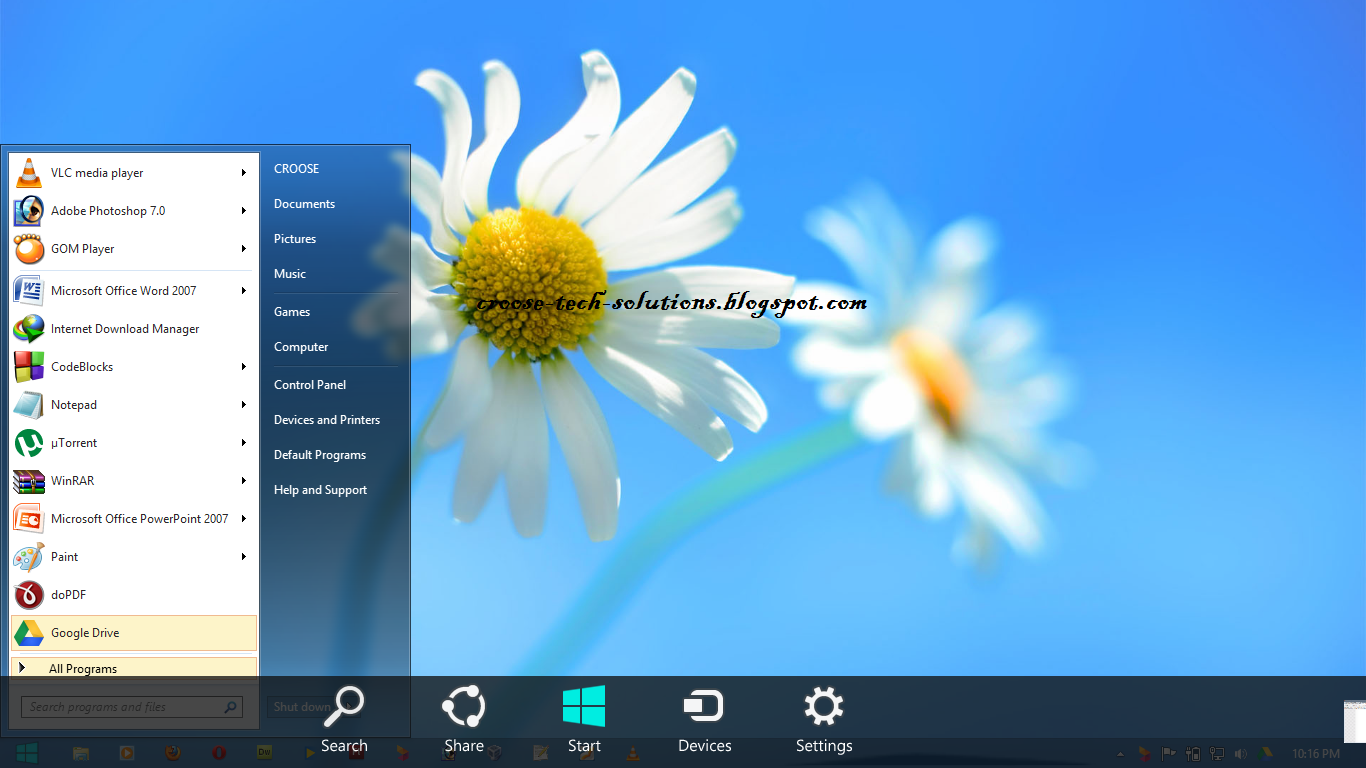
Windows 8 Transformation Pack 4.0 for XP/Vista/7 Full Free - This time i am going to share a program that will change the appearance of Windows XP/Vista/7 that we use to be like windows 8. Not just looks alone, we can also use the Metro UI which is one of the flagship Windows 8. This program can be run very well on Windows XP, Windows Vista and Windows 7, for installation on windows XP and 7. I have tried myself and there is no problem, please look at sreenshot more below.


Features
  • Seamless installation and uninstallation giving users safe transformation
  • Easily configurable in single click with intelligence Metro UI design
  • Designed for all editions of Windows XP/Vista/7 including Server Editions
  • Genuine Windows 8 system resources with Metro touches
  • Smart system files updating with auto-repair and Windows Update friendly
  • Fresh start for Vista/Seven Transformation Pack users with updated Windows 8 themes and resources
  • UxStyle memory patching
  • Windows 8 themes, wallpaper and logon screen
  • UserTile with current user auto-configured on login
  • Metro UI desktop emulation with pre-configured gadgets
  • Aero's auto-colorization feature
  • And much more


What's New in This Release
  • Added Charms Bar as alternatives for those who can't get full Immersive UI to work
  • Added new Segoe family fonts from Windows 8 Consumer Preview with Windows Vista/7 font update support
  • Improved system files modification framework (More secure and safe to handle)
  • Fixed disabling system files modification that won't work on installation
  • Fixed explorer not restoring after choosing to cancel restart during configuration
  • Fixed permission problems in some programs that perform changes in Program Files
  • Fixed system files modification bug in Program Files on x64 platform
  • Fixed unchecking large icon doesn't restore icon size bug
  • Fixed uninstallation script that removes legacy theme registry
  • Updated component UI font to Tahoma and info font to Segoe UI
  • Updated default Metro Desktop UI option to Immersive UI with Charms Bar as default option
  • Updated default pictures of guest and user to Windows 8 Consumer Preview ones
  • Updated Metro Inspirat Windows XP visual style to version 3.0
  • Updated Newgen to version 8.0
  • Updated Newgen UI to match with Windows 8 Consumer Preview
  • Updated system files resources
  • |-logon screen
  • |-shell branding and logo
  • |-shell icons
  • |-start button/orb
  • |-system tray icons
  • Updated TrueTransparency skin based on Windows 8 Consumer Preview default color
  • Updated wallpapers to Windows 8 Consumer Preview ones
  • Unchecked 'Aero's auto-colorization (Vista/7) only' feature to get Windows 8's default colorization


Update Link download

Manage your desktop using Fences 1.01 includes crack


A new version of Fences was released earlier this month, adding a couple of new tricks to the Windows desktop organizer.You get the same easy functionality of creating shaded areas (aka fences) on your desktop for organizing your files and folders. It lets you create rules, which automatically direct certain types of files to particular fences. Fences 1.01 introduces two new and useful features -- Folder Portals and Desktop Pages -- but before we get to them, let's quickly go over how the app works.

When you launch Fences 1.01, you can either start with a default layout or start from scratch and create your own fences. Choose the former, and the app will organize all the icons on your desktop, save the Recycle Bin, into fences. In my case, it created three fences: Programs, Folder, and Files & Documents.
To create a new fence, draw a rectangle on your desktop and choose "Create Fence here." You can then name and resize the fence. You can also drag the fence to reposition it, and there are a number of views and ways to sort a fence, which are accessible from a pull-down menu located in the upper-left corner of a fence.

Click the X in the upper-right corner to close a fence. When closing a fence, you can choose to delete all of the files contained therein, or you can close the fence while leaving its files on your desktop.
Lastly, you can double-click to hide all of the fences on your desktop, and you can exclude certain folders from this quick-hide feature (from the View menu accessible from the upper-left corner). Double-click again and your hidden fences reappear.

 New features: 

  1. Folder Portals and Desktop Pages.
A Folder Portal does not take you to another dimension, but it does offer a live view from your desktop to any folder. There are three ways to create a Folder Portal. You can hold down the Alt key while dragging and dropping a folder to your desktop, draw a rectangle on your desktop and choose the "Create Folder Portal here" option, or you can right-click on a folder and choose "Show this folder on the desktop." Not only does a Folder Portal give you quick access to the contents of a commonly accessed folder, but it also lets you open the folder by double-clicking the header or any blank space of a Folder Portal.
     2. Desktop Pages lets you create multiple desktop screens (aka pages). Much like swiping through screens on a smartphone, you can swipe through these Desktop Pages. To swipe, move your cursor to the side edge of your display and drag while holding down the left-mouse button. Or you can hold down both mouse buttons and drag from anywhere on the screen. You can also use the Alt key and the arrow keys on your keyboard to swipe through your pages. To move a folder from one page to another, simply drag it to the edge of your screen.

Download Here

Installation

1. Install Fences.
2. Copy file from crack folder to install folder, overwriting existing file.
3. You're good to go!!

Have Fun, Say Thanks..

Monday, October 22, 2012

Gmail Notifier Pro 4.0.4 Multilanguage with serial key

Gmail Notifier Pro is a Windows application capable of checking multiple Gmail accounts for new mail and display notifications.

After installing the tool, open the Options window and set up your account Gmail. You can use the method of access, or Atom, or IMAP. Once configured, you can see all the messages in the main window and a separate window lets you view the contents of the e-mail. Every

time when a new e-mail message, you will be notified, and the desktop will look pretty cool.
It supports themes that can be configured out of the window Options. Set up a notifier so how do you like best. When you need to create a new email, simply click on the Compose New Email option in the system tray.
Features:
- Gmail Notifier Professional with many features, easy to use and settings.
- Check multiple Gmail accounts for new mail - including Google Apps accounts.
- Shows popup notification and play audio messages, alerting the user when new mail arrives.
- A complete overview of all unread emails in all your mailboxes.
- Support for Atom and IMAP protocols.
- Allows you to create and respond to e-mail without opening a browser.
- Integration with Google Contacts.
Feature highlights
- Check multiple Gmail accounts, including Google Apps, for new mail.
- Supports both Atom and IMAP protocols for mail.
- Supports customizable themes and individual account settings, making Gmail Notifier Pro the best looking Gmail notifier on the web!
- Read, write, reply, preview and save attachments, mark as read and delete mail without the web browser. Supports Google Contacts.
- Integration with Google Calendar accounts gives reminders for calendar events.
- Get news notifications from Google News & Google Reader.
- Supports RSS / Atom feeds to get notifications from any news source.
- Gmail Notifier Pro provides many easy-to-use features and settings.
- Define schedules when to check for mail and display notifications.
- In addition to the installation package, Gmail Notifier Pro can also run from a USB-stick without any installation.
- Gmail Notifier Pro supports automatic updates. A new version can be downloaded and installed with a single click.
- Secure account management and encrypted connections (HTTPS / SSL) are used. 100% FREE from virus, spyware and adware.
- Gmail Notifier Pro is simply the best Gmail notifier for Windows.
- Supports 32-bit & 64-bit Windows XP, Windows Vista & Windows 7.

Tuesday, September 25, 2012

How to check whether your virus guard is working properly

         In present you can find so many virus guards or anti virus programs. But you don't know that whether your virus guard detect and delete all the viruses, spyware, trojans, worms and other malware functions. Some virus guard detect some files as malwares. But same ma not detect them. Therefore it is very difficult to find best antivirus program. Therefore here i am giving you a small test for your virus guard. If your Virus guard pass the test , your virus guard application working properly. You can test effectiveness of your anti virus program  using this simple trick .
Follow the steps below to know more:
  1. Open Notepad.
  2. Copy the code give below in the notepad file:
  3.  X5O!P%@AP[4\PZX54(P^)7CC)7}$EICAR-STANDARD-ANTIVIRUS-TEST-FILE!$H+H*  
    
  4. Save it as eicar.com
As soon as you save this file, check whether your anti virus program will detect the file (virus) immediately and will attempt to delete it. If this happens then your Antivirus is working properly. If not, then its time to look for some other reliable anti virus program.
I am using Avast anti virus program and it detect above eicar.com file as follows

Block unwanted web sites using FireFox Extension

     When you surf the web, you can see there are so many unwanted sites or prohibited web sites for children. These sites contains adult contains. If your child use web for him or her education purposes, it is highly required to protect your child from surfing these adult web sites. Because it will damage future of your child. Also we can see that in some offices,universities and institutes some web sites like facebook are blocked.
    To block web sites we can found so many applications that may freely available or not. But here i am going to say about a free web site blocker  for your FireFox web browser. This is an extension for FireFox.

Go to this Link :   Site blocker extension
  Then click on the green button that says Add to Firefox. Then it will be installed on your Firefox web browser.
  Then go to tools tab and click on add-ons.
  Then select BlockSite.
  Then click on preferences.
 Then Set password and add web sites that you want to block.
  Additionally, this extension will disable all hyperlinks to these websites, by just displaying the link text without the clicking functionality.

Friday, September 21, 2012

How to downlaod youtube videos in ubuntu

             In present, most of computer users use open source operating systems like Linux distributions. Because nowadays it is very interesting and we can find millions of open source application for these operating systems.

           This post will guide you to download videos from YouTube. For Windows users, there are countless programs that let you play and download YouTube videos from your desktop. Also there are many ways to download YouTube videos in Ubuntu. Here i am going to discuss three different ways.

  1. Download from  your Firefox web browser in Ubuntu
    • Using YouTube downloader extension
                    Firefox is the pre-installed  web browser in your ubuntu operating system. It will install automatically when you install the operating system. By adding add-ones or pluggins for Firefox web browser you can downland YouTube videos.                                                            
    CLICK HERE TO ADD YOUTUBE DOWNLOADER
     From the above link visit Firefox Easy YouTube Video Downloader. Page will appear as follows                                                                                                                                                                                           Then click on add to Firefox button. Then it will automatically add YouTube downloader for your Firefox. That's all you are done. When your surfing the YouTube, this will create a button to download YouTube videos in many formats.
    • Using Flashgot extension
               Flashgot is an another extension for downloading movies or audio clips of web pages at aximum speed with a single click.
  2. Download using terminal in Ubuntu                                                                              There is an application to install in your ubuntu for downloading youtube videos. This is command based process. So should have to use your terminal in ubuntu. First of all open your terminal and copy and paste the following.
    • Using youtube-dl 
                 YouTube-dl is a command line tool that helps you download videos from
      YouTube. To install it, open the Terminal and run the commands below.

       sudo apt-get install youtube-dl  
      

      To download videos from YouTube using youtube-dl, run this command and the URL of the video.

       youtube-dl <YouTube Video URL>  
      
  3. Copy from your tmp folder
           This is one of the better way to downloading YouTube videos is Ubuntu is not the right keyword, you can actually copy-paste the YouTube video. As simple as that. Lets see how.
    • While watching YouTube videos in Ubuntu(in any browser), let the video to buffer/load completely. Afterwards in your file browser(nautilus), browse to the /tmp directory, like shown in the screenshot below.
       
    • Now in the /tmp directory, you will have the YouTube video you just saw. It should be with a filename similar to the one in the below screenshot.
    • Simply copy paste the file to some other place other than the /tmp directory, say Desktop, for example. Remember, you will have to copy-paste the file before closing the browser tab that contain the YouTube video. Thats it. Wasn't that easy. Have fun.

Thursday, September 20, 2012

Use Temporary e-mails for your day to day activites on the web

                     When you surf the web, some web sites require your email addresses. Some of these site are very important and it require your exact email address you regularly use. Also you may use these sites regularly. But in some cases, like downloading a software some web sites require your email. But these sites require your exact email and it require only any mail addresses. Also you may not use these sites regularly.  These temporary (disposable) email services before which can be used to register to certain web services without revealing your true email address. This is great if you do not want to risk that the website is selling your email address.
                 This is however a security risk if you register at a service that is sending passwords to the email again if you have forgotten them. Everyone who knows the email that you have registered with could use the forgotten password request to get your password.
Following are some of disposable email generators. Every email generators provide you various feature. Such email activating time. Some of them give you 10 minutes of time for as your email activating time and some of them gives your 1 hour.
  1. Mailinator 
  2. YOPmail 
  3.  Melt Mail
  4. Mailcatch
  5. Incognito Mail
  6.  Stop my spam
  7.  Emailthe.net

Wednesday, September 19, 2012

Manage your loading web pages using Developer tool for Firefox web browser

               Developer tool is one of the greatest add-on for Firefox web browser. This definitely help for web developers and also web users. Because this extension help you to get knowledge and all the information about your viewing web pages. Also this can manege your loading web pages and also your views of the web.

Advantages

  1. you can minimize your data usage by disabling or unloading external site images or all the images. 
  2. you can minimize your data usage by disabling page colors. Other page colors also get an amount of data that white color.
  3. Can disable cookies, caches , pop up blockers, proxies .... etc.
  4. You can get all information about loaded web pages. such as CSS, HTML, image, form used for particular web page.
  5. You can validate HTML, CSS, Feeds, Links ... etc for your web pages.
  6. Much more........
So this extension must helpful for web developer and also web users. Don't forget and use it now for your Firefox web browser.

                         Developer Tool


Sunday, September 16, 2012

Download IDM 7.1 Preactivated Silent Installer

                 Internet Download Manager is by far the most popular well-known download software available. I am going to give you the latest IDM 7.1 . It is Preactivated, no need of crack or serial. Just you can not update the software.

                 IDM is a tool to increase download speeds by up to 500 percent, resume and schedule downloads. During the download process Internet Download Manager segments downloaded files dynamically, unlike other download accelerators and managers that segment files before the download starts Internet Download Manager reuses available connections without additional connect and login stages to achieve better acceleration performance.
               Internet Download Manager supports proxy servers, ftp and http protocols, firewalls, redirects, cookies, directories with authorization, MP3 audio and MPEG video content processing, and a large number of directory listing formats.
              IDM integrates seamlessly into Microsoft Internet Explorer, Netscape, MSN Explorer, AOL Explorer, Opera, Mozilla Firefox, Mozilla Firebird, Avant Browser, MyIE, Google Chrome, and all other popular browsers to automatically handle your downloads.

                                       Download  IDM 7.1 Per-activated

Installation:

1. Uninstall the previous version of IDM.
2. Clean registry.
3. Restart PC
4. Install manually IDM 7.1.exe file.


Don't Update the software

Saturday, September 15, 2012

Best Antivirus To protect Your Computer

               Today, an unprotected computer isn’t just vulnerable, it’s probably already infected. New viruses, spyware, trojans, worms and other malware debut every day. New threats are disguised to bypass other security measures and specifically designed to catch your PC off guard. The virus landscape has also changed. Viruses that used to be annoying pranks have evolved into pernicious threats capable of destroying your computer and stealing your identity. The benefits of installing a basic security solution on your PC are obvious, but the cost in system slowdown used to make it tough to bear. Luckily, modern antivirus software haven’t just improved their level of protection, they’ve significantly improved resource efficiency and overall speed. You can have ultimate protection without giving up your resources. With advanced technologies and straightforward usability, antivirus software is more effective than ever. Say goodbye to annoying security warnings and noticeable slowdown; current antivirus programs deliver constant protection and can actually speed up your computer.
              The last generation of antivirus software brought advanced heuristic detection into the mix. Continuing to improve, the current lineup of antivirus products often incorporate further developed proactive protection with better behavior checking and file-reputation analysis. Several of the products incorporate in-the-cloud security and other advanced technologies to increase safety and convenience. From gamer modes to battery saving settings to integrated web-link scanners, antivirus applications are more versatile and have upped the ante for features and functionality.

Bitdefender Antivirus Plus  

                  Bitdefender Antivirus is the best virus guard that protect your computer. This gives you 100% protection for your Windows 7, Windows xp and Windows vista.  System repairing and virus guard usability is also greater than other virus guard. Also it  provide some features for your computer.
    Also provide Live Chat, eMail and Phone Support to contact users and you can get this virus guard for your 32 bit or 64 bit architecture operating system. It is not freely available. But following will provide full version of bitdefender with key for your 32 bit operating system.
Bitdefender Antivirus Plus 2012 Full + serial + keygen!!!!!
                 Download Bitdefender Antivirus Plus 2012 Full + serial + keygen

Installation

Install Bitdefender Antivirus Plus 2012 Open serial key text file or generate new serial Insert serial key Enjoy unlimited days!!!!! Every key works more than 170 days!!!!!!!